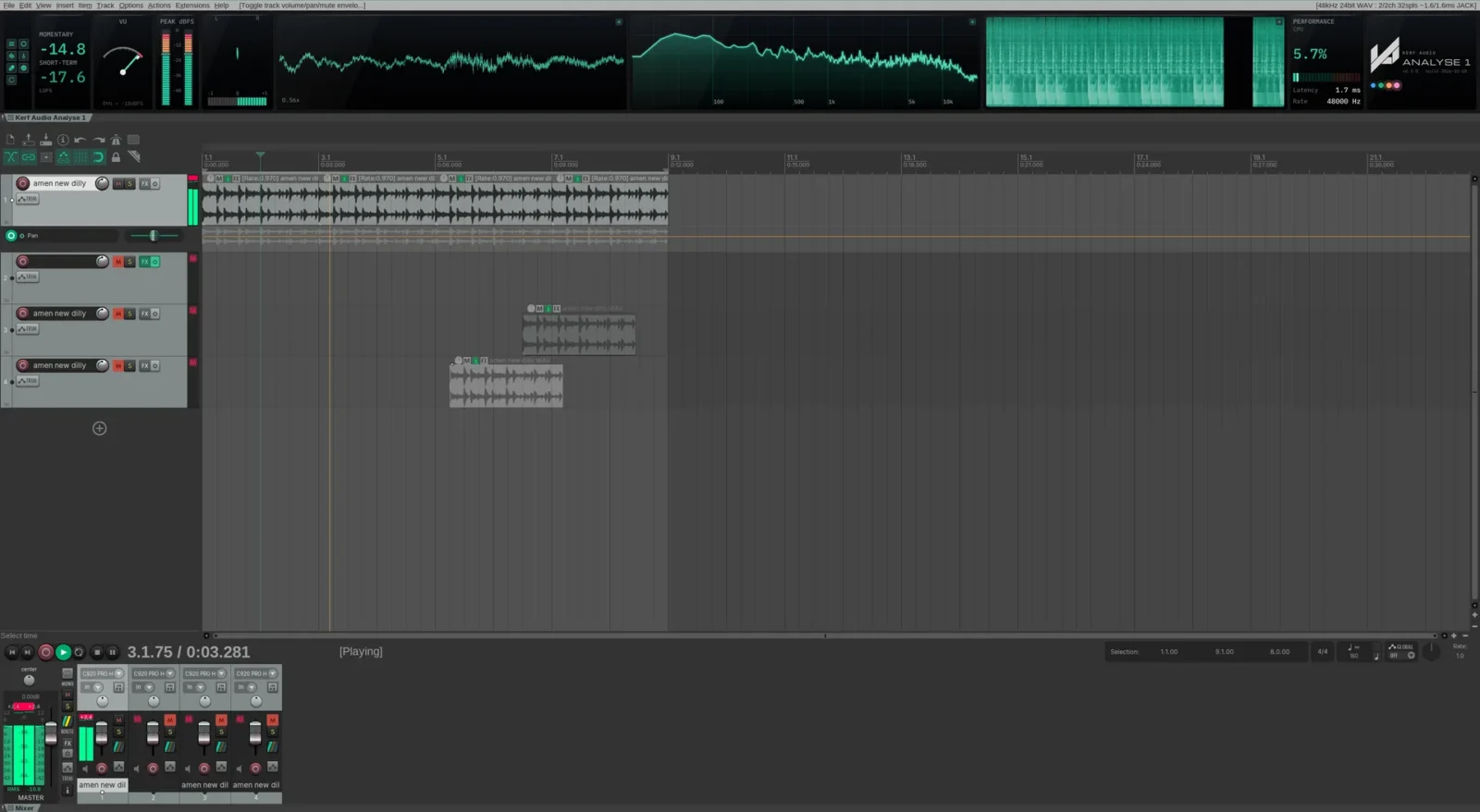
Kerf Modulators for REAPER · coming soon
Modulators
LFOs and envelopes for any plugin in REAPER
A docked panel that gives every plugin on a track its own modulators. Draw an envelope, pick an LFO, draw a wave or follow another track, then map it to any parameter. Coming soon to Linux, at a beta price of £19.
The problem
REAPER can modulate almost anything, but getting there means parameter modulation dialogs, one plugin parameter at a time, or routing a JSFX LFO through parameter links. It works. It is also slow, scattered across windows, and hard to see once a project grows.
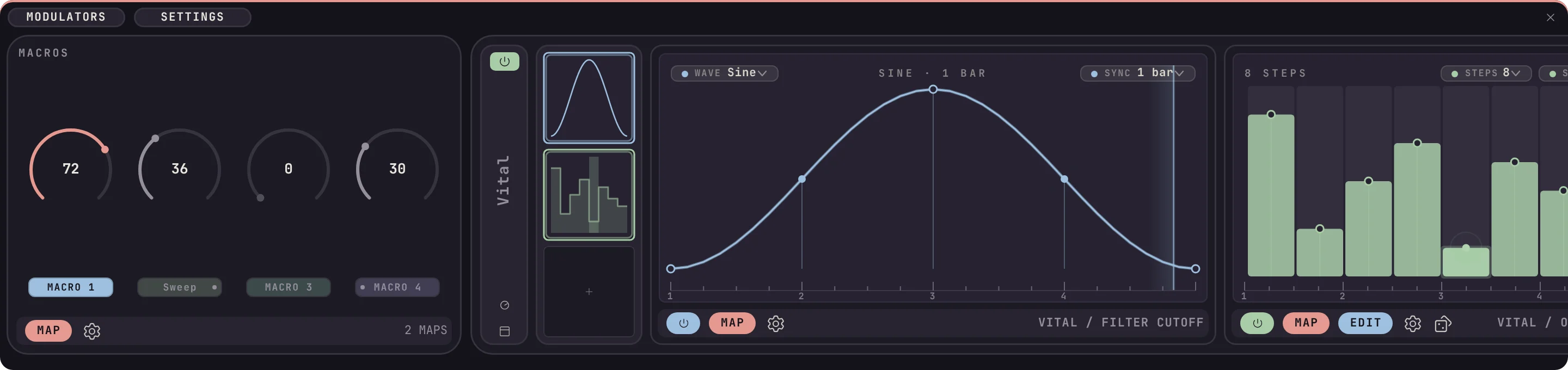
Kerf Modulators puts the modulation for a track in one place. Every plugin on the selected track gets a block of slots in a docked panel. Fill a slot with a modulator, map it, and it runs. Select another track and its blocks appear instead, while the first track carries on moving.
Movement without the routing

Draw the envelope
Add, drag and curve nodes, with vertical edges and a grid to snap to. Free, synced to the transport or one-shot, with delay, jitter and a loopable section.

Shapes that keep time
Sine, triangle, saw and square, plus random and Perlin noise, in hertz or locked to the project tempo, with depth and phase.

Follow any track
Turn a track's level into movement, with attack, release and depth. The source can be the same track or another one.
One modulator, many targets
Map a modulator to up to twelve parameters, each with its own amount and polarity.

Macros that belong to the track
Every track has four macro knobs from the moment it exists. Name them, drive them from modulators, and reach them from other tracks.
Saved with the project
Every track's modulators, curves and maps go into the .RPP and come back on load. They keep running when the panel is closed.
How it works

Open the panel from Extensions › Modulators: Show/hide panel. It is a real REAPER docker, so it docks, floats and remembers where you left it.
The panel shows one block per plugin on the selected track, with up to twelve modulator slots in each, three at a time. An empty slot shows a plus. Click it, pick a modulator, and its editor opens beside the block. Press MAP and choose parameters from the plugin, or from plugins on other tracks.
Modulation is kept per track. Every assigned modulator keeps running while the panel is hidden or another track is selected, and the whole lot is written into the project file when you save.
Retrigger follows the transport: it restarts on play, at clip starts and at the loop point, and the bar length reads the project’s real time signature, so 1 bar in 6/8 means what it says.
When it launches, buy it once and it goes into the downloads in your account, with every update as it comes.
What it runs on
- Format
- REAPER extension
- Host
- REAPER 7.8 or later
- Platforms
- Linux, macOS coming soon
- Requirements
- REAPER 7.8 or later, 64-bit Linux x86_64 with glibc 2.35 or later macOS 26 Tahoe or later: coming soon
- Version
- 0.5.0, 11 October 2026
- Licence
- A licence key with every purchase. Run it on every computer you own.
Questions
Does it work with any plugin?
It works with any plugin REAPER hosts on the track, whatever its format: VST, VST3, CLAP, AU or JSFX. It drives the parameters REAPER exposes. If a plugin does not expose a parameter to REAPER, it cannot be mapped.
How is this different from REAPER's own parameter modulation?
REAPER’s built-in parameter modulation is set up one parameter at a time, from each plugin’s own window, with an LFO, an audio signal or a link to another parameter. Modulators puts every plugin on the track in one docked panel, with envelopes, LFOs, drawn waves and followers you can see moving, and keeps it all in the project.
Do I need it if REAPER already has LFOs?
Not always. For one parameter on one plugin, REAPER’s own parameter modulation is free and works well. Modulators is for when you want several moving parts on a track, shapes you draw yourself, and everything visible in one place.
What does MSEG mean?
Multi-segment envelope generator: an envelope you draw yourself, point by point, rather than one picked from a list of shapes.
Do the modulators stop when I close the panel?
No. Modulation belongs to the track, not the panel. Close it, select another track or switch project tabs, and assigned modulators keep running.
What happens to my project if I uninstall it?
The project opens as normal. The modulation settings stay in the file and come back if you reinstall.
Which platforms will it run on?
Version 0.5.0 runs on 64-bit Linux, with REAPER 7.8 or later. Kerf is Linux first: the paid release launches on Linux first, with an installer, and a macOS build for macOS 26 Tahoe and later (universal, for Apple silicon and Intel) follows. There will be no Windows version.
What will it cost?
£19 while Kerf Modulators is in beta, going up to £29 at version 1.0. It is a perpetual licence, with no subscription: for personal use, run it on every computer you own. If you downloaded the free 0.5.0 beta, you get a licence free.
Recent changes
Coming soon, at a beta price
Kerf Modulators launches on Linux first, with an installer, at £19 while it is in beta and £29 from version 1.0. It is a perpetual licence: for personal use, run it on every computer you own. If you downloaded the free 0.5.0 beta, you get a licence free.
Keep informed about access
One email when Kerf Modulators is out, with the beta price. Nothing else unless you ask for it.
Analyse 1 for REAPER
Loudness, VU, peak, phase, scope, spectrum and spectrogram for your master bus, in one strip docked across the top of REAPER. Free when it launches, on Linux first.